

A good computer mouse can make a noticeable difference when you spend hours working at your desk. Whether you’re editing photos, managing spreadsheets, coding, or simply browsing the web, comfort and productivity matter.
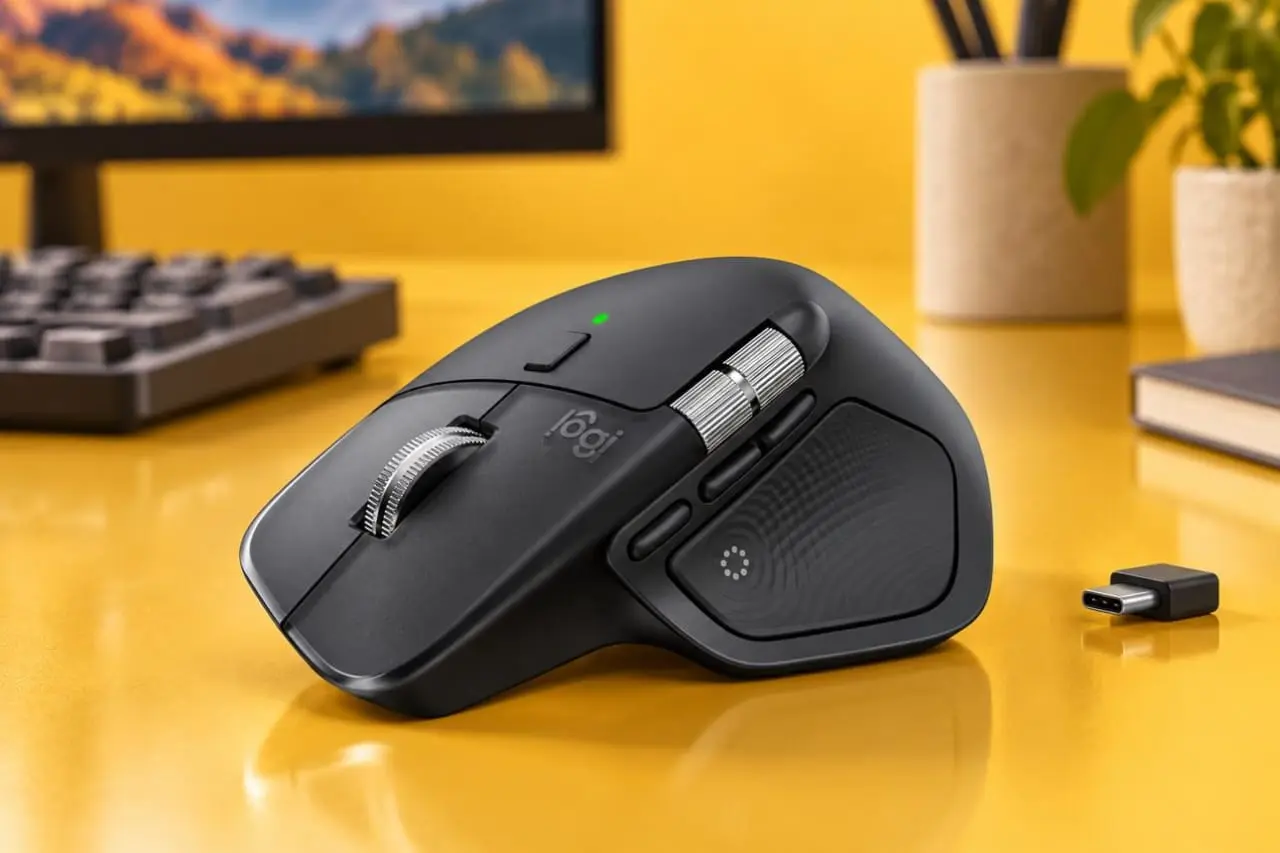
The Logitech MX Master 4 is a premium wireless mouse designed for professionals and everyday power users. Released in September 2025, it builds on the popular MX Master series with customizable haptic feedback, additional shortcuts, and refined controls.
But is the MX Master 4 worth buying in 2026, especially if you already own the MX Master 3S?
In this review, we’ll explore its specifications, features, strengths, and limitations to help you decide.
Editorial note: This review is based on Logitech’s published specifications and independently published product testing, rather than our own hands-on testing.
Logitech MX Master 4: Key Specifications
| Feature | Specifications |
|---|---|
| Product | Logitech MX Master 4 |
| Type | Wireless productivity mouse |
| Sensor | Darkfield high-precision |
| Maximum DPI | 8,000 |
| Connectivity | Bluetooth and Logi Bolt receiver |
| Battery life | Up to 70 days (manufacturer claim) |
| Charging | USB-C |
| Weight | Approximately 150 grams |
| Multi-device support | Up to 3 devices |
| Launch price (US) | $119.99 |
1. Design and Comfort
The Logitech MX Master 4 features an ergonomic shape designed primarily for right-handed users.
Its sculpted body provides support for the palm and thumb, while the side controls are positioned to help users navigate documents and applications without relying entirely on keyboard shortcuts.
Compared with the MX Master 3S, the newer model uses revised exterior materials rather than the older extensive soft-touch coating.
This change may appeal to users concerned about coating wear over time.
However, the MX Master 4 is relatively heavy at approximately 150 grams. Users who prefer lightweight mice, especially for travel or fast movements, may find it less appealing.
Design verdict: A strong option for desk-based productivity, but not the best fit for every hand size or personal preference.
2. Performance and Precision
The MX Master 4 uses Logitech’s Darkfield sensor, supporting sensitivities up to 8,000 DPI.
According to Logitech, the sensor can track on a wide variety of surfaces, including glass.
This makes the mouse particularly useful for people who move between home offices, meeting rooms, and different desk setups.
Its MagSpeed scrolling system is another major feature.
The primary scroll wheel supports both precise scrolling and fast movement through long documents, spreadsheets, and web pages.
There’s also a horizontal thumb wheel, which can be useful for navigating timelines, wide spreadsheets, and creative software.
However, the mouse is designed for productivity rather than competitive gaming. Its weight and standard 125Hz polling rate are less suited to fast-paced esports than dedicated gaming mice.
3. Haptic Feedback and Actions Ring
One of the most notable upgrades in the MX Master 4 is its customizable haptic feedback.
The mouse includes a Haptic Sense Panel near the thumb that provides tactile responses for supported interactions.
Logitech has also introduced an Actions Ring, a customizable on-screen shortcut menu powered by Logi Options+.
Depending on your setup and application, you can configure shortcuts to perform common tasks without navigating through multiple menus.
For example, these controls may help users:
- Access frequently used creative tools.
- Navigate between applications.
- Trigger customized commands.
- Reduce repetitive mouse movements.
These features can improve certain workflows, but their value depends on how much time you’re willing to spend configuring them.
People who mainly browse websites or check email may not benefit as much from the extra customization.
4. Battery Life and Charging
Battery life is another important advantage of the MX Master 4.
Logitech advertises up to 70 days of battery life on a full charge, although actual battery performance depends on usage and settings.
The mouse charges through USB-C, and Logitech states that one minute of charging can provide up to three hours of use.
This is convenient for users who want to avoid regularly replacing disposable batteries.
It’s important to remember that the mouse is wireless and cannot be treated as a conventional wired gaming mouse simply by connecting its charging cable.
5. Connectivity and Software
The MX Master 4 supports wireless connections through Bluetooth and compatible Logi Bolt receivers.
Users can pair the mouse with up to three devices and switch between them.
This makes it particularly interesting for professionals who work with more than one computer.
Logitech’s Logi Options+ software allows users to customize buttons, create application-specific shortcuts, and use supported cross-computer workflow features.
However, some advanced functions depend on compatible operating systems, software versions, and applications.
6. Logitech MX Master 4: Pros and Cons
Pros
- Comfortable, right-handed ergonomic design for desk use.
- Precise 8,000 DPI sensor.
- Excellent MagSpeed scrolling functionality.
- Long manufacturer-rated battery life.
- Customizable haptic feedback and shortcut controls.
- Multi-device connectivity.
- Quiet primary clicks.
Cons
- Premium price compared with basic wireless mice.
- Relatively heavy design.
- Not suitable for left-handed users.
- Not optimized for competitive gaming.
- Some advanced features require software configuration.
- Haptic feedback may offer limited value to casual users.
7. MX Master 4 vs. MX Master 3S: Should You Upgrade?
If you already own the MX Master 3S, upgrading may not be necessary.
Both models offer strong productivity features, excellent scrolling, multi-device functionality, and an 8,000 DPI sensor.
The MX Master 4 mainly stands out through its updated physical design, haptic feedback, additional controls, and Actions Ring.
These improvements may appeal to professionals who rely on customized shortcuts throughout the day.
However, if your existing MX Master 3S works well, the practical benefits may not justify replacing it.
For someone buying their first premium productivity mouse, the MX Master 4 is worth considering alongside a discounted MX Master 3S.
8. Is the Logitech MX Master 4 Worth Buying in 2026?
The MX Master 4 is best suited for people who spend significant time working on a computer and want an advanced mouse with customizable productivity features.
It makes the most sense for:
- Office professionals.
- Programmers and developers.
- Designers and photo editors.
- Content creators.
- Users working across multiple computers.
On the other hand, casual users might be perfectly satisfied with a less expensive wireless mouse.
Competitive gamers should generally prioritize a lighter, gaming-focused alternative.
Frequently Asked Questions
Is the Logitech MX Master 4 good for gaming?
It’s suitable for casual gaming, but its weight and relatively low polling rate make it less ideal for competitive gaming.
Does the MX Master 4 work with Mac?
Yes. Logitech offers a Mac-specific version, and compatible MX Master 4 models can be used with supported Mac computers.
How long does the battery last?
Logitech advertises up to 70 days of use from a full charge. Actual results vary.
Is it better than the MX Master 3S?
The MX Master 4 adds haptics, updated controls, and design refinements. Whether those features make it better for you depends on your workflow.
Final Verdict
The Logitech MX Master 4 is a strong premium wireless mouse for productivity-focused users.
Its combination of precise tracking, versatile scrolling, multi-device connectivity, and extensive customization makes it an attractive option for people who work on their computers every day.
However, the premium price, substantial weight, and limited appeal of some advanced features mean it isn’t the ideal mouse for everyone.
Our recommendation: Consider the MX Master 4 if you want a customizable productivity mouse and regularly use advanced shortcuts. If you already own a functioning MX Master 3S, compare the prices and features carefully before upgrading.